 WhichModel
Too many models, too many dials
Have you ever stared at a model list and just picked the biggest one to be safe? I have. A lot.
It's an expensive habit. A company's top model can cost 80 times more than its small one, and for a lot of everyday jobs the small one does it just as well. Tagging 200 emails doesn't need the same brain as designing a new app from scratch.
Then there's the second dial: how hard the model should think (low, medium, high and up). Turn it up on a simple job and you pay for thinking you didn't need. Leave it low on a job where a mistake hurts, and you get a quick answer that's wrong.
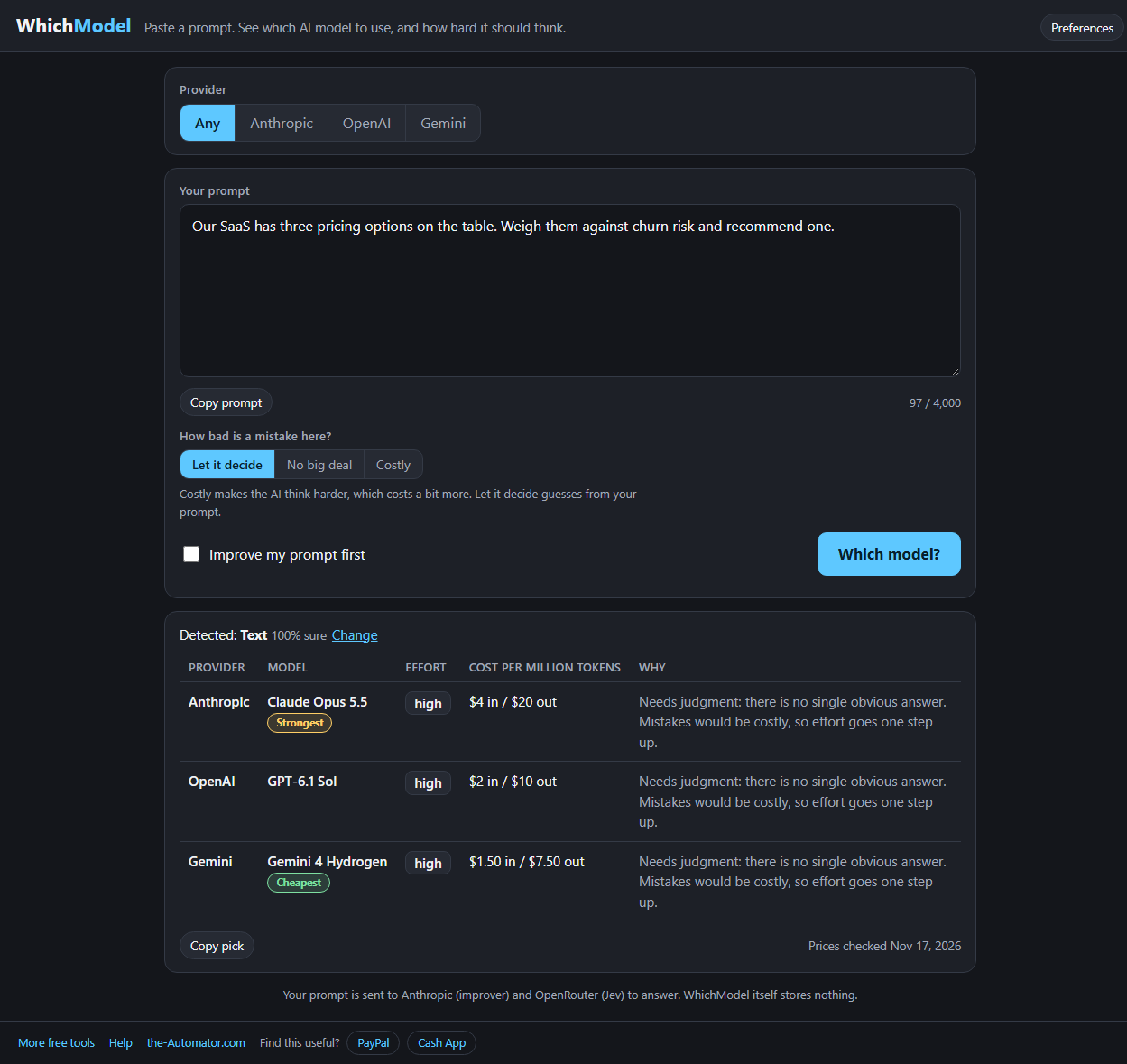
WhichModel looks at your actual prompt and sets both dials for you.
How it works
- Paste your prompt. The same one you were about to give the AI. Up to 4,000 characters.
- Press Which model? A small, fast classifier reads it and works out what kind of job it is and how much judgment it takes. That usually takes under a second.
- Read the answer. You get one row each for Anthropic, OpenAI and Gemini: the model, the effort or quality setting, what it costs, and a one-line reason.
- Fix it if it guessed wrong. The kind of job it detected is always shown, with a Change link right beside it.
It's not just for text
Ask for a logo, a video clip, a voiceover, a transcript, a jingle or search embeddings, and WhichModel switches to the models that actually make those things. For media it picks a draft model or a final-quality model, depending on what you're after.
If a company doesn't offer that kind of model, the row says so plainly instead of hiding it. That alone can save you a half hour of hunting.
Cheapest and Strongest
Two small badges do a lot of work. Cheapest marks the lowest price among the picks in front of you. Strongest marks the most capable one.
Sometimes they land on the same row. More often they don't, and then you can see exactly what the extra money buys you before you spend it.
Prices come from the public price list at OpenRouter and are checked once a day. The date is shown under every result, so you know how fresh the numbers are.
Improve my prompt first
There's an optional checkbox for this. Tick it and WhichModel rewrites your rough prompt into a clearer one before it picks the model: what you want, who it's for, the format, and placeholders in [brackets] for the details only you know.
It rewrites your prompt. It doesn't answer it. And if you don't like the new version, one click on Undo puts your original back.
Why I built this
I built a little launcher for myself that picks the model and the effort level before I start a session with Claude. It turns out I was overpaying on easy jobs and under-thinking the hard ones.
This is the public version of that idea, and it covers OpenAI and Gemini too. It doesn't matter which company you use. The goal is the same: the right tool for the job, without wasting time or money.
Why I ask for your email
Running this costs me a little every time someone presses the button, and the sign-up keeps robots from running up the bill. I might also send you a note now and then about other free tools I build.
I will never sell or give your email to anyone else.
Questions people ask
Is it really free?
Yes. There's a daily limit of 100 picks and 20 prompt improvements per person so nobody runs up the bill.
Does it run my prompt?
No. It only reads your prompt to decide which model fits. You still take the prompt to the AI you choose.
What happens to my prompt?
It's sent to OpenRouter for the classifier, and to Anthropic if you use the improver. WhichModel itself stores nothing.
What if it gets the kind of job wrong?
Click Change next to the detected kind and pick the right one. The answer updates right away.
Do I need to install anything?
No. It runs in your browser on a computer or phone.